
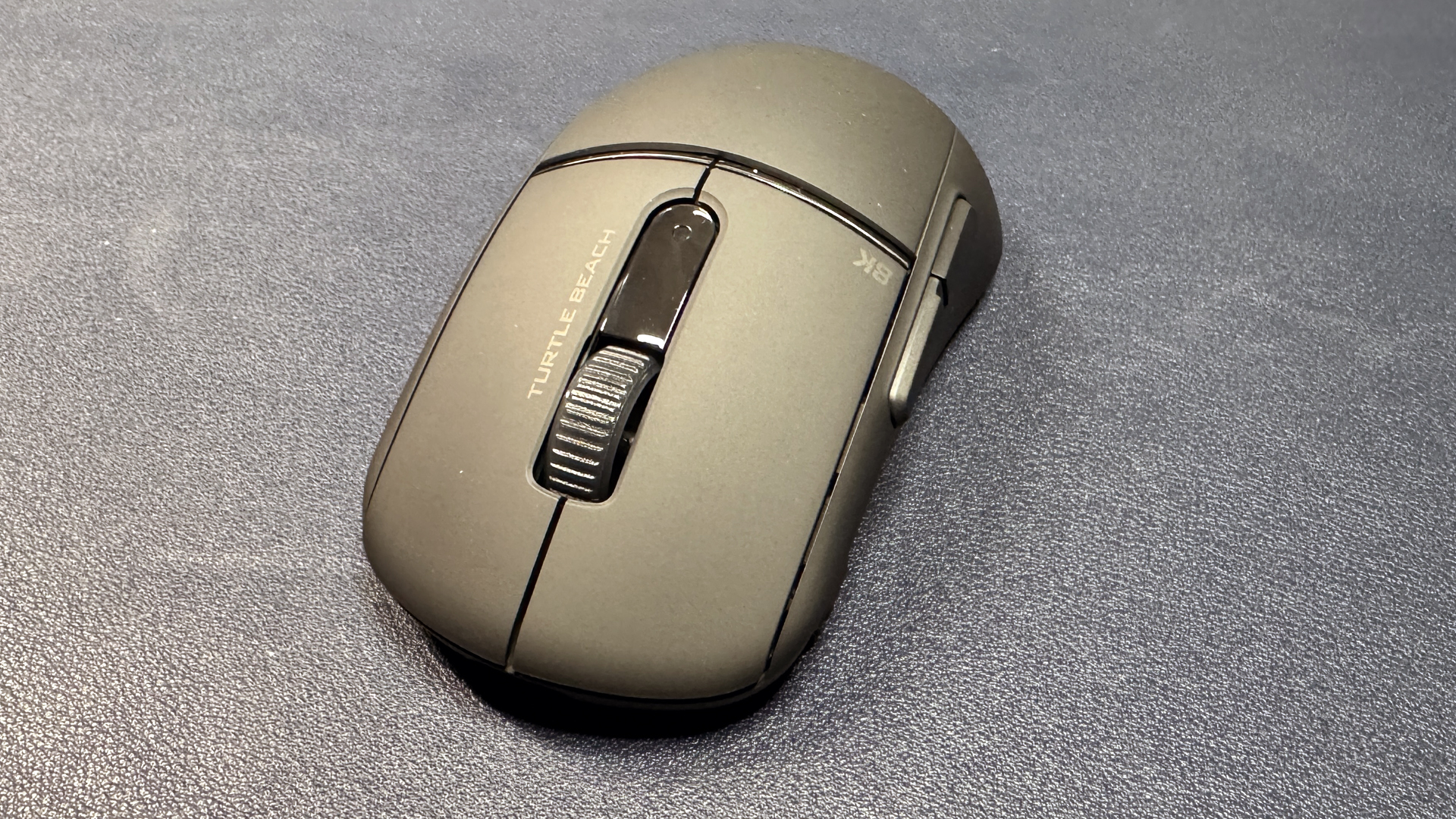
There are a lot of ultra-lightweight wireless gaming mice with 4K or 8K polling rates out there right now. So much so that it’s getting hard to differentiate them, partly because they’re not doing much to differentiate themselves. Turtle Beach’s new Burst II Pro probably isn’t going to make our list of best gaming mice, but it’s the latest ultra-lightweight (57g), speedy, stripped-down wireless gaming mouse with 8K polling (both wired and wireless). And, well, it looks a lot like the rest.
The Burst II Pro is an ultra-lightweight wireless gaming mouse with six programmable buttons and eight programmable inputs, and… not much else. It features Turtle Beach’s Owl-Eye 30K optical sensor, which has a maximum resolution of 30,000 DPI and a maximum speed of 750 IPS, can handle up to 70 Gs of force, and it gets up to an 8,000 Hz polling rate over both its 2.4GHz wireless connection and its wired connection (it comes with a special, shielded USB-C to USB-A cable to ensure the absolute lowest latency). It’s a lot like other ultra-lightweight wireless gaming mice with 8K polling rates, though it does have a DPI button that’s located on the left side, near the front — a somewhat unique placement. But, for the most part, it’s just like other mice in its category.
Design and Comfort
The Burst II Pro is an ultra-light wireless gaming mouse with a fairly basic shape — pseudo-symmetrical, with curved sides and a centered, even hump. It features a lightweight plastic shell with a smooth, soft-touch matte finish and a metallic accent line that separates the primary mouse buttons from the palmrest. The finish looks and feels nice, but it does attract fingerprints — I had to wipe down the mouse daily to remove shine.
Turtle Beach’s palm tree logo is printed in dark gray on the mouse’s hump, and the brand’s text logo is printed on the mouse’s right primary button (alongside the scroll wheel). “8K” is printed in the corner of the left scroll button, presumably to remind you that this mouse boasts wireless polling rates of up to 8,000 Hz, at the price of battery life, of course.
Image 1 of 2


The mouse’s shell feels fairly sturdy, but the sides do creak a lot — even with just a little pressure. This wasn’t much of an issue for me, as I don’t grip the sides of my mice particularly hard (I’m definitely a palm gripper), but it is concerning in a stripped-down, ultra-lightweight mouse. The mouse is aimed at gamers who prioritize speed and mobility over everything else, and many of these gamers do tend to grab and pick up their mice by the sides. While side creaking doesn’t usually mean an issue with structural stability, it can definitely be frustrating and noticeable while you’re playing.
Image 1 of 4


The Burst II Pro is slightly smaller than most modern flagship mice — it’s not tiny, but those with smaller hands will probably find it a little easier to wield than something like the Razer DeathAdder V4 Pro. The mouse is 4.81 inches (122mm) long by 2.65 (67mm) wide at its widest point — its sides curve inward, making it slimmer where your fingers will be gripping. It’s closer to 2.3 inches (58.17mm) wide at that point. It’s also very, very lightweight, weighing in at 2.01 ounces (57g).

The mouse has five buttons, not including the scroll wheel click: primary left/right mouse buttons, two side thumb buttons, and a DPI button that’s also located on the left side, near the front (close to where you might find a sniper button on other mice). This is an interesting place to put the DPS switch, but I don’t mind it. I definitely prefer having the DPS switch here, rather than somewhere truly inconvenient, such as the underside of the mouse. The DPS switch is programmable, so you can remap it to do just about anything, but it’s located slightly too far forward to be convenient to press.
Image 1 of 2


The bottom of the mouse has a couple of geometric cutouts (to reduce weight, presumably), as well as a cutout section for storing the mouse’s USB-A dongle. It also has a power switch for toggling between 2.4GHz wireless and Bluetooth, as well as four PTFE skates at each corner. It’s such a lightweight mouse that you probably won’t have any issues with gliding, but if you’re looking for a different feel, Turtle Beach does include a few different options for mouse feet: a set of larger feet, and two sets of dots you can place anywhere (PTFE and UMHW-PE).

In the box, the Burst II Pro comes with a 5.9-foot (1.8m) USB-C to USB-A “8K PhantomFlex” cable, which is fabric-covered and low-drag (though it’s stiffer than other flexible cables I’ve used, such as HyperX’s HyperFlex cables). It also comes with a 2.4GHz USB-A dongle and a USB extender, as well as pre-cut grip tape and the aforementioned extra mouse skates.
Specs
|
Sensor Model |
Owl-Eye 30K optical sensor |
|
Max Sensitivity |
30,000 DPI |
|
Max Speed (IPS) |
750 IPS |
|
Max Acceleration |
70 G’s |
|
Polling Rates |
8,000 Hz (wireless) |
|
Programmable Buttons |
6 |
|
LED Zones |
0 |
|
Cable |
5.9ft / 1.8m USB-C to USB-A |
|
Connectivity |
2.4GHz wireless, Bluetooth, wired (USB-C) |
|
Measurements (L x W x H) |
4.81 x 2.65 x 1.55 inches / 122 x 67 x 39 mm |
|
Weight (excluding cable) |
2.01oz / 57g |
|
MSRP / Price at Time of Review |
$139.99 |
|
Release Date |
Oct. 13, 2025 |
Performance
The Burst II Pro features Turtle Beach’s latest Owl-Eye 30K optical sensor, which has a maximum sensitivity of 30,000 DPI and a maximum speed of 750 IPS, and can handle up to 70 Gs of force. According to the company, the sensor is optimized for “99.8% resolution accuracy on all surfaces including glass.” This probably doesn’t mean you can use it on a freshly-cleaned, fully-transparent glass windowpane, but it should still work almost perfectly on glass tables, desks, and mouse pads.
And it did work perfectly on all of the surfaces I tested it on, which included a variety of mouse pads (hard, soft, hybrid, glass) and different tabletops (wood, laminate, and frosted glass). In all of my tests, the sensor was smooth, speedy, and very accurate — even over uneven surfaces. Of course, most will probably be using this mouse in a pretty standard gaming environment, so accuracy shouldn’t ever be an issue.

The Burst II Pro sports Turtle Beach’s Titan optical switches, which are rated for up to 100 million clicks. The switches have a firm, stable click with a solidly tactile feel; they are on the louder side, though I’ve personally never found loud mouse switches to be a problem. The side buttons also have fairly clicky (and fairly loud) switches. This may not be the mouse for you if you’re planning on gaming in the dead of night and hoping to stay relatively silent while doing so.
Like many other ultra-light modern gaming mice, the Burst II Pro features up to an 8,000 Hz (0.125ms latency) polling rate. I maintain the opinion that almost nobody will actually benefit from an 8,000 Hz polling rate in any peripheral — but if there was a peripheral in which it would make a difference, it would be a gaming mouse. You can adjust the mouse’s polling rate in Turtle Beach’s Swarm II peripheral software.
Features and Software
The Burst II Pro works with Turtle Beach’s Swarm II software. The mouse works fine out of the box, but you’ll need the software to download and install firmware updates, change various settings such as DPI steps, lift-off distance, and polling rate (1,000 Hz by default), and to remap buttons.
Image 1 of 3


The mouse has eight programmable inputs: the left/right primary buttons, the two side thumb buttons, the DPI switch, the center scroll wheel click, and the scroll wheel’s up/down scroll. While you probably won’t remap the main input for most of these buttons, you can also activate Easy Shift, which gives you a second layer of programmable inputs.
Wireless Experience and Battery Life
The Burst II Pro has three forms of connectivity: 2.4GHz wireless, Bluetooth, and wired (via USB-C). Its default polling rate is the standard 1,000 Hz, but the included 8K wireless dongle and the 8K USB-C to USB-A cable allow for up to 8,000 Hz polling rates over both wireless and wired connections.
Turtle Beach rates the Burst II Pro’s battery life at 150 hours (with a 1,000 Hz polling rate), which is very good — on par with similarly lightweight mice, such as the Razer DeathAdder V4 Pro. Of course, switching to an 8,000 Hz polling rate drops this number down to just 40 hours (as you might expect). Still, that’s not too bad — you should still be able to go a few days without charging.
Bottom Line
The Turtle Beach Burst II Pro is a comfortable, ultra-lightweight gaming mouse with 8K wired and wireless polling rates — and it’s quite a bit cheaper than flagship standouts such as the Razer DeathAdder V4 Pro. Still, it’s not the cheapest ultra-lightweight 8K polling wireless mouse — you can find similar mice for less than the Burst II Pro’s $139.99 retail price, such as the Glorious Series 2 Pro Wireless — and it’s not a very exciting mouse otherwise. I did like the location of its DPI switch (though I don’t find myself switching DPI… ever, basically), but it’s placed a little too far forward to be remapped as anything else.

The Burst II Pro is… fine — it’s not doing much to differentiate itself from its competitors, aside from having noticeably creaky sides, and it’s a solid mouse if you’re looking for wireless 8K polling — it’s just not a standout in this increasingly crowded field.


