Mobile Pixels Duex Float 2 Pro 16" Portable Second Monitor for Laptops for $279
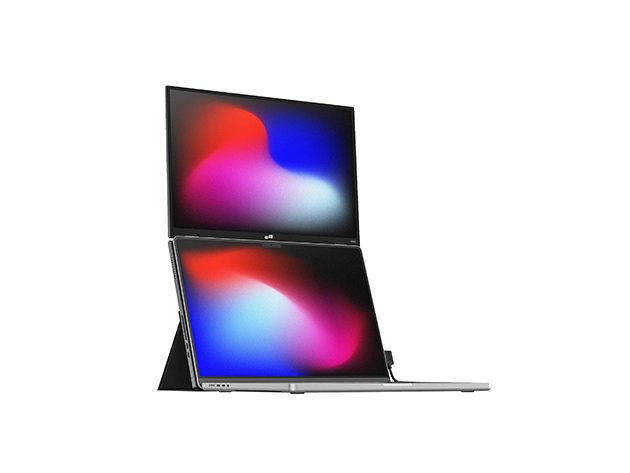
Transform Your Workspace with a Stacked Dual Display
The Duex Float 2 Pro 16″ is a versatile and portable secondary monitor designed to elevate your laptop workspace with its impressive 2.5K display. Featuring a 16-inch IPS LCD panel with a 16:10 aspect ratio, it boasts a resolution of 2560 x 1600 and a 120Hz refresh rate, delivering crisp, smooth visuals and vivid colors with 100% sRGB coverage. To enhance viewing comfort, it comes with an anti-glare finish, a brightness level of 350 nits, and a contrast ratio of 1200:1.
Designed for seamless connectivity and ergonomic versatility, the monitor features dual USB-C ports that support 65W pass-through charging along with a mini-HDMI port—all elegantly integrated into a robust, stacked magnetic design. The newly engineered kickstand offers three flexible viewing configurations: stacked second screen, presentation mode, or a freestanding display, adapting effortlessly to your needs. With integrated stereo speakers and a plug-and-play setup, this monitor is compatible with a variety of operating systems, making it the perfect companion for any professional workflow.
Three viewing modes for maximum flexibility
- Dual-Screen Mode: Extend or mirror your laptop screen for an ergonomic, efficient workspace.
- Presentation Mode: Flip the screen 180° to share content with colleagues or clients effortlessly.
- Desktop Mode: Use it as a standalone display for gaming, content creation, or document viewing.
Versatile use and effortless experience
- Built-In Dual Speakers: Crisp, immersive stereo sound for an engaging multimedia experience.
- Anti-Glare Screen: Reduces reflections & eye strain for comfortable viewing during work, gaming, or movies.
- Easy Setup & Travel Ready: Single USB-C cable handles both video & power for effortless, on-the-go use.
Ultra sleek and portable
- Sleek & Lightweight: 20% thinner & 33% lighter than the Duex Float 1
- Built-In Kickstand: Use it independently or attach it magnetically to any laptop size.
- Wide Compatibility: Works with macOS, Windows, Linux, Nintendo Switch, and select Android devices (Samsung DeX) via USB-C or Mini-HDMI.
Set up in seconds
- Open the cover & rotate the screen out.
- Fold the cover back & stick it to the base part of the monitor.
- Attach the monitor to your laptop via optional magnets.
- Connect the cable to your laptop.
Source: www.stacksocial.com…