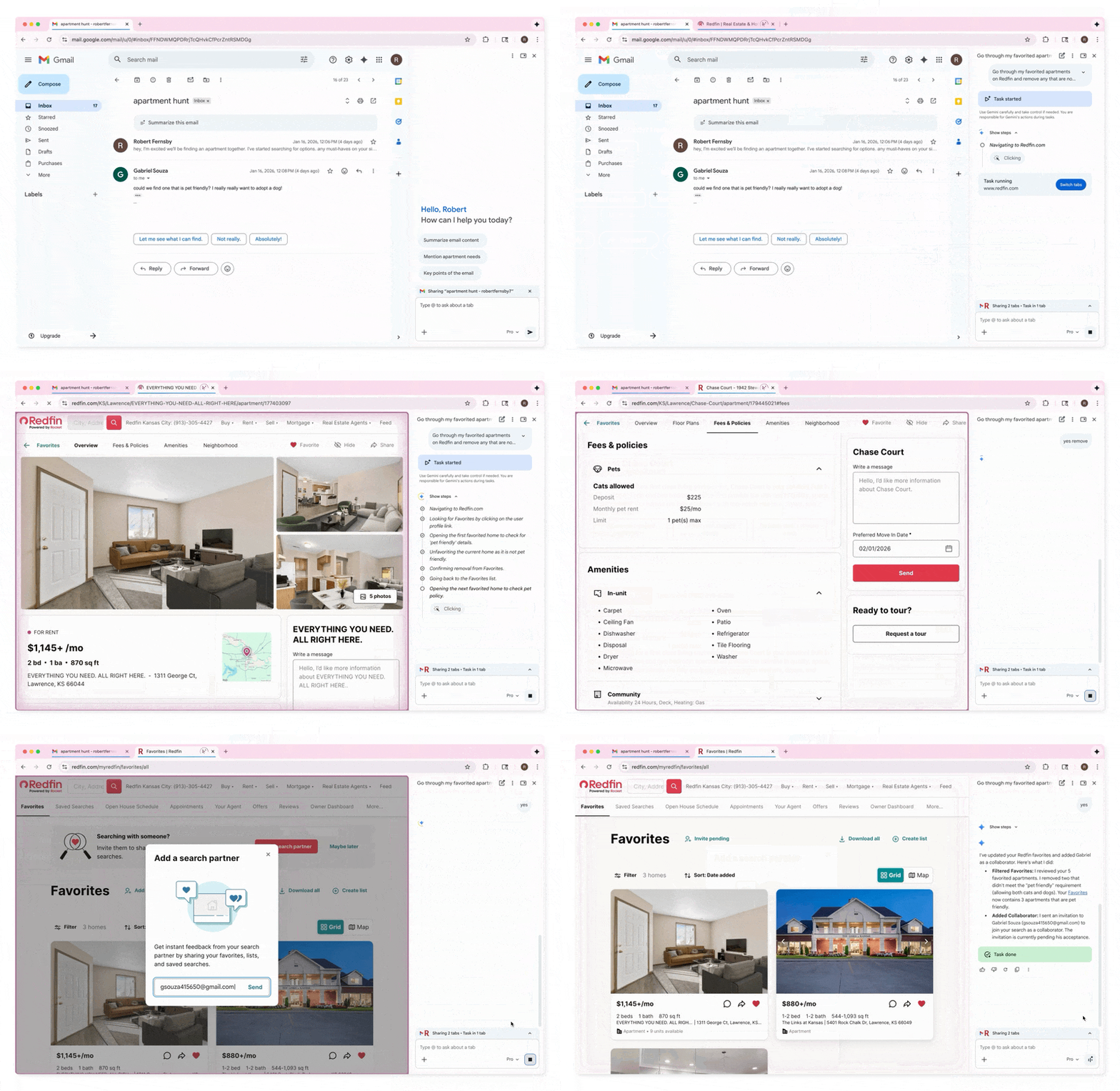
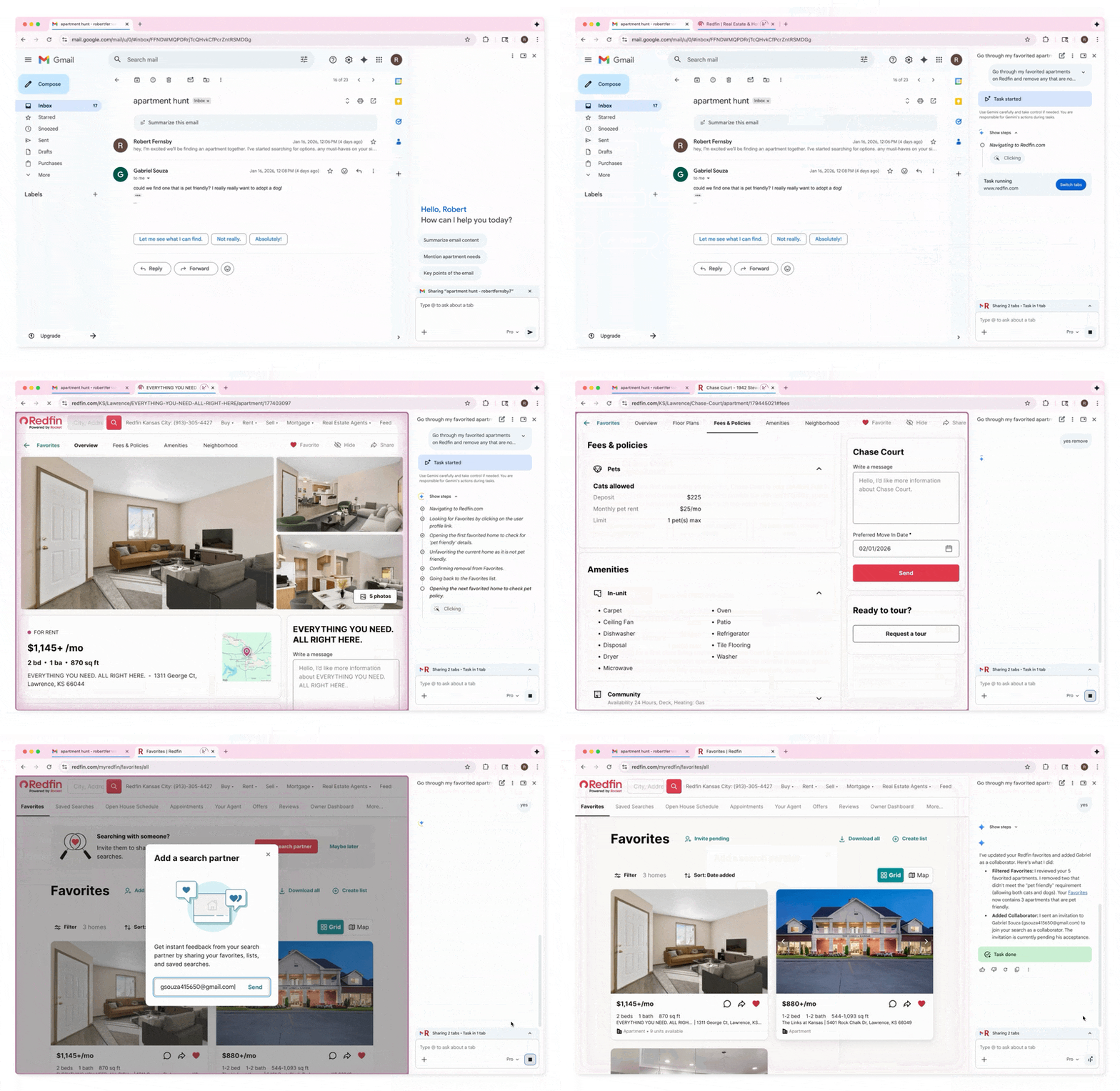
For a while now, Google has been on a mission to extend its Chrome browser with more AI features, powered by its Gemini models. Now, the company is launching a slew of new AI features based on Gemini 3 that include a new Auto Browse feature, a new AI side panel for interacting with Gemini and an integration with its Nano Banana imaging model.
It is also bringing built-in Gemini support to Chromebooks.
Let Chrome browse for you
The flagship feature of this launch is Auto Browse. This isn’t a new idea, of course. Many startups have been developing tools to let an AI agent browse for you, but Google’s first mainstream release in this area is definitely notable.
During a press conference ahead of the announcement, Charmaine D’Silva, Chrome’s Director of Product Management, noted that “Auto Browse is when we make Gemini in Chrome feel truly agentic.”
Available to paying Gemini Pro and Max subscribers soon, Auto Browse will let you describe a task — be that finding a flight to Vegas or orchestrating a more complex professional workflow — and then the browser will try to complete as much of that task for you as it can.
Auto Browse will also support Google’s recently launched Universal Commerce Protocol, making it easier for the agent to browse shopping sites and get you to the checkout page.
Letting an AI agent browse for you isn’t new, of course, and there are even a few other auto-browse tools on the market with the same name. With Project Mariner, Google’s DeepMind unit itself demonstrated some of these capabilities in the spring of 2025. To try out Project Mariner meant having a Gemini Ultra account, though. Now, a Pro plan is enough to give this a spin.
How useful this feature is will depend a lot on the speed. Many similar projects still suffer from being extremely slow. One advantage of Auto Browse is that you can let it work in one tab and continue to work in another, which may alleviate this problem a bit.
Chrome gets a Gemini side panel
The most obvious new UI features is the new side panel. Until now, to open Gemini in Chrome, you had to click on the Gemini icon at the top right of the browser, which would then open a pop-up window. That always felt like a somewhat provisional and disconnected user experience and made it harder to use Gemini while also browsing other tabs.
D’Silva acknowledges as much. “Through that launch, we did get a lot of feedback from our users saying that one thing they really, really missed out on is the ability to actually have many of these conversations going at the same time.”
Now, the new sidepanel lets you interact with the model independently, but it is also aware of the browser context, of course. And because it knows what you are doing in the browser, you can now also ask it to, for example, compare different products you are researching across browser tabs.
Gemini in the new Chrome side panel (Credit: Google).
Nano Banana in the side panel
With this new side panel, users can also invoke Google’s Nano Banana model to transform any images that are currently open in the browser. Some of those may be copyrighted or news images, which opens up all kinds of issues, especially because this makes it far easier to manipulate them since there’s no need to download the images and then upload them to a model again. Nano Banana does have built-in guardrails, but where there is a will, there is usually a way.
Looking beyond the browser context, Gemini in Chrome was also recently updated to support Connected Apps. That’s Google’s term for integrations with services like Gmail, Google Calendar, YouTube, Maps, Google Flights, and others.
As Google notes in its announcement, that means if you’re going to a conference, Gemini can find the context for that trip and search Google Flights for matching flights — and then draft an email to tell your colleagues when you will arrive in Las Vegas, a city you really didn’t want to have to travel to yet again, so you were glad Gemini helped you keep the cognitive load low.
YOUTUBE.COM/THENEWSTACK
Tech moves fast, don’t miss an episode. Subscribe to our YouTube
channel to stream all our podcasts, interviews, demos, and more.